
Active Directory Federation Services (ADFS) is a Windows service that allows for single sign on to many applications. This solves a unique problem in enterprise business as the number of accounts and credentials employees use daily increases. During a given morning, I myself log into Salesforce, Gmail, Dropbox, Outlook, WordPress and many other accounts that allow me to do my job effectively. ADFS saves users from having to remember or write down 50 different credentials and ties all of these logon credentials to a single Windows Active Directory credential. From a user perspective, this is great. Now I only need to login once, and ADFS will automatically log me into every account that I wish.
While ADFS is great as a convenience tool, it actually makes companies more vulnerable to security risks. As we discussed in a previous blog, usernames and passwords are not secure . They can be lost, stolen, or written down and stored under keypads leaving them vulnerable to anyone with preying eyes. ADFS does not increase the security of logon; it actually paints a larger target on the Windows Active Directory credentials. Now a perpetrator, who desires access to company systems only needs to compromise one set of credentials if ADFS is installed. So how does a company implement ADFS and take advantage of their convenience and cloud features without sacrificing their security?
Luckily, HID Global has come out with an innovative solution called ActivID Tap
, that allows for companies to use an HID Seos card along with their Active Directory credential to achieve two factor authentication on ADFS. The workflow of this solution is very simple and easy to use. When a user sits down at their machine, they are prompted by ADFS to input their active directory credentials, same as it always does. But after the credential is accepted, the user is prompted to tap their Seos ID Card to the HID Omnikey smart card reader as a second means of authentication. Using ActivID Tap, the credential is kept safe because even if the password is lost or stolen, the user must have the corresponding ID card to authenticate to the system. 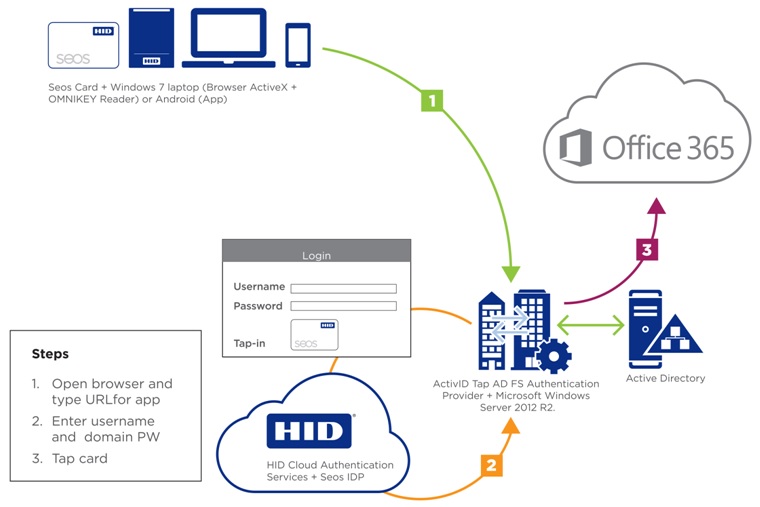
But that is not all. ActivID Tap also works on Android devices that have an embedded NFC reader. For those who are unfamiliar, most modern Android smart phones and tablets have an integrated contactless smart card reader (known as NFC) that can read the HID Seos card. The user can authenticate using their ADFS credential by typing in their username and password through the ADFS login page just as they do on their PC. And just like on their PC, they will be prompted to tap their card. Instead of having a USB smart card reader at their desk, they simply tap the Seos card against the back of the smart phone and they are logged in. ActivID Tap is so simple and easy to use, there is no reason not to implement it if you are using ADFS